
What Is a Text Reverser and Where Is It Actually Useful?
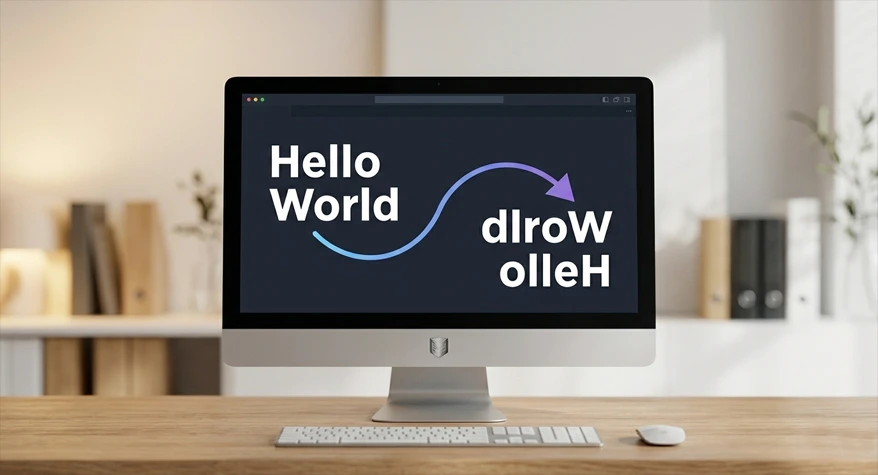
When reversing sentences, reversing characters, or being creative with formatting text, a text reverser may not be the bulk tool that it may seem; rather, it is one that is extremely wise to have around. Developers, writers, Twitter users—whoever you are—you probably use a reverse text online tool.
You will read in this document to find out what a text reverser really is, how it is implemented, and in what situations it truly helps.
What Is a Text Reverser?
A text reverser is a simple online utility that flips the order of characters, words, or even full lines. Depending on the tool, it can reverse text letter by letter or word by word.
For example:
- Input: “Hello World”
- Character reverse: “dlroW olleH”
- Word reverse: “World Hello”
The Text Reverser tool is built for this exact purpose, making it easy to reverse content in a few clicks.
How Reverse Text Online Works
A backwards text generator works using basic string manipulation. It takes your input text and rearranges it based on the option you choose.
There are usually three common methods:
- Character reversal: Flips every character from the end to the start.
- Word reversal: Keeps words intact but changes their order.
- Line reversal: Reverses each line in multi-line content.
For example, reverse string online logic often looks like this:
“abcdef” → “fedcba”
This is the same kind of logic developers use in JavaScript, Python, and other languages when they need to test string handling or build custom text tools.
Why People Use Text Reversers
At first glance, reversing text may seem like a novelty. In reality, it serves a range of practical purposes across different fields.
Content Editing
Writers and editors sometimes use reverse words in a sentence to check sentence flow or spot awkward phrasing. Seeing text in a different order can make repeated patterns or weak structure easier to notice.
Programming
Developers often use a reverse string online method for:
- Debugging string logic.
- Testing coding exercises.
- Working with algorithms such as palindrome checks.
Social Media
People also flip text backwards for captions, bios, and posts when they want something visually different. It can make a simple line feel more playful or eye-catching.
Data Tasks
In some cases, reversing text helps with:
- Text transformation.
- Pattern testing.
- Basic processing workflows.
Real-World Uses
A text reverser is useful in more places than most people expect.
Coding and Testing
Developers often reverse strings to test functions or verify output. A dedicated tool saves time when checking how an application handles text.
Layout Checks
Designers may reverse text during interface testing to see how layouts respond to unusual content patterns.
Learning and Practice
Students and language learners sometimes use reversed text to study spelling patterns or sentence structure in a different way.
Puzzles and Games
Text reversers are also used in:
- Word puzzles.
- Escape room clues.
- Riddle creation.
Manual vs Tool-Based Approach
You can reverse text manually, but it is rarely the best choice for anything beyond short phrases.
Manual Method
- Takes more time.
- Increases the chance of errors.
- Becomes impractical with long text.
Tool-Based Method
Using a tool like Text Reverser gives you:
- Instant output.
- Better accuracy.
- Easy switching between reversal modes.
If you need to reverse a long paragraph, a tool is far more efficient than doing it character by character.
How to Reverse Text Online
Using a reverse text online tool is simple.
- Copy your text.
- Paste it into the input field.
- Choose whether you want characters, words, or lines reversed.
- Click the reverse button.
- Copy the result.
The Text Reverser tool is designed to keep this process quick and straightforward, even for users who are not technical.
Common Mistakes When Reversing Text
Even a simple tool can produce confusing results if used carelessly.
Wrong Mode Selection
Many users confuse character reversal with word reversal. That can lead to output that looks incorrect for the task.
Ignoring Punctuation
Special characters, symbols, and punctuation can change how the reversed text appears.
Skipping Review
Always check the output before using it in content, code, or design work.
How to Avoid These Problems
- Choose the correct reversal type.
- Preview the result before copying it.
- Use a reliable online tool instead of guessing the logic manually.
Why a Backwards Text Generator Is Different
A backwards text generator and a text reverser are often used as if they mean the same thing, but there is a small difference.
- A text reverser focuses on functional reversal, such as characters, words, or lines.
- A backwards text generator may also include stylized or mirrored text effects.
In practice, many modern tools combine both ideas, so users can work with text in a way that fits their task.
How to Reverse Words in a Sentence
If you want to reverse words in a sentence without changing the spelling of each word, the tool should reorder the words only.
Example:
- Original: “This is a simple example”
- Reversed words: “example simple a is This”
This is useful for sentence analysis, basic content editing, and layout experiments. It is also much faster than doing the rearrangement manually.
Reverse String Online for Programming
Developers often need reverse string online functionality when working with:
- Palindrome checks.
- Data validation.
- String transformation tasks.
- Coding exercises.
For a simple example in programming, a string could be separated into characters, then the array reversed and joined back together. That is fine and well, but when a quick answer is needed while testing a method, a tool is quicker.
Best Free Text Reverser Tools
A good text reverser should be fast, simple, and accurate. It should also support multiple output styles so users can switch between character reversal and word reversal when needed.
Supporting Tools That Help
For users who regularly work with text and writing tools, online utilities can significantly improve productivity and accuracy. The Word Counter helps users quickly analyze their content by counting words, characters, and other text metrics, making content management more efficient and reliable.
You can also combine text reversal with other workflow tools when you are editing content, checking length, or preparing structured text for publishing.
Practical Tips for Better Results
To get the most from a reverse text tool, use it with a clear purpose.
- Use word reversal for sentence-order testing.
- Use character reversal for coding and string checks.
- Avoid reversing full HTML or code blocks unless you know the output is meant for that format.
- Review the final text before publishing or sharing it.
These small habits help prevent mistakes and save time.
Why Text Reversers Are Still Useful
A text reverser may look basic, but it solves a real problem fast. It removes the need to manually flip characters or reorder words, which is especially helpful when dealing with longer content or repeated tasks.
Whether you are using reverse text online for writing, development, learning, or creative work, a dependable tool makes the process easier and more accurate. The Text Reverser tool is a simple example of how a small utility can save time in everyday work.
Frequently Asked Questions
1. What are the differences between a text reverser and a backwards text generator?
A text reverser generally rearranges characters, words, or lines in a systematic manner. A backwards text generator can sometimes feature mirrored and ornate graphics. In reality, people often use the two terms as synonyms to describe online reverse text applications.
2. Are you able to reverse the words in a sentence without affecting their spelling?
Yes. A good tool can transpose the words of a sentence, with each word remaining identical to the original. It is very practical when it comes to editing a small piece of content, learning a sentence, or simply doing basic experiments with text.
3. Why do developers use online reverse string tools?
Developers use these reverse string online tools for fast testing, with instant and easy palindrome checks as well as string-related exercises. It saves time from having to write a piece of code and run it just to get a quick result. This is especially useful during debugging or checking debug output.
4. Is it easier or better to flip text manually or through a tool?
Manual reversal is feasible with very short text. However, for anything over a couple of lines, a tool is necessary as it will be quicker and more accurate. Manual reversal is less reliable as it is prone to errors, whereas a text reverser provides instant feedback and is faster to use.
5. In which applications may I utilize the Text Reverser utility?
You can utilize the text reverser to reverse characters, reverse the order of words, or test the behavior of some text. Happy to help writers, programmers, students, and anyone else working with text.