
Number Formatting in Financial Reports: Examples and Best Practices
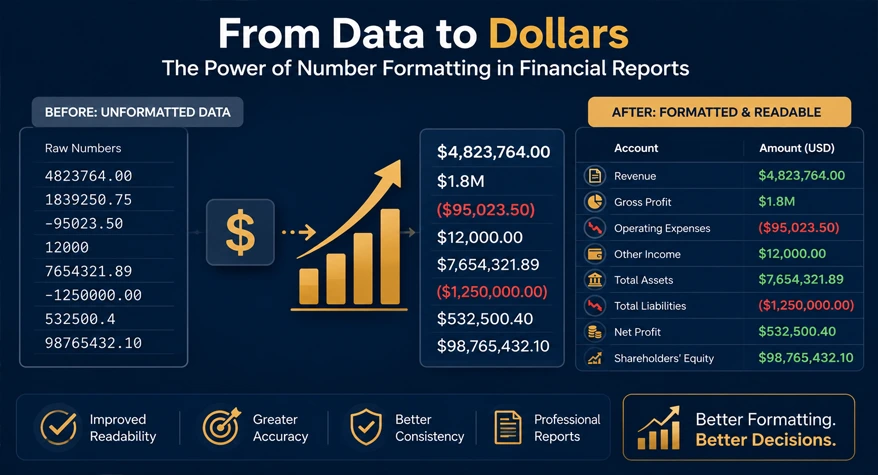
Financial reports contain large amounts of numerical data, so consistent formatting is essential for comparing revenue, expenses, assets, liabilities, budgets, and variances.
A financial report may use different formats for currency, percentages, negative values, decimal places, and large figures shown in thousands or millions. The correct format depends on the type of report and the level of detail required.
This guide shows practical number-formatting examples for income statements, P&L reports, balance sheets, budget vs. actual reports, management dashboards, and Excel.
Common Number Formatting Mistakes in Financial Reports
Common problems include:
- Mixing decimal places within the same financial category
- Using different currency formats in the same table
- Showing negative values inconsistently
- Mixing thousands, millions, and full values without a clear unit
- Rounding some figures while leaving comparable figures unrounded
- Showing percentages with different decimal precision
- Using different number formats across reporting periods
For example, a report should not show revenue as $1,250,000 in one column and $1.25M in another unless the units are clearly identified.
Financial Report Number Formatting Best Practices
Currency and Decimal Places
Use the same currency and decimal precision for comparable monetary figures.
For example:
| Revenue | Amount |
|---|---|
| Product Sales | $1,250,000.00 |
| Service Revenue | $850,000.00 |
| Total Revenue | $2,100,000.00 |
If the report is presented in whole dollars, use whole dollars consistently rather than mixing $1,250,000 with $850,000.00.
Negative Numbers
Negative values can be displayed using parentheses:
($25,000)
or a minus sign:
-$25,000
Choose one convention and use it consistently.
Percentages
Use consistent decimal places for percentages.
For example:
- 12.5%
- 8.2%
- -3.7%
Avoid mixing 12.50%, 8%, and -3.7% in the same comparison unless the different precision is intentional.
Thousands and Millions
Large financial reports can use a stated unit to make tables easier to read.
For example:
Amounts in USD millions
| Item | 2025 | 2026 |
|---|---|---|
| Revenue | 12.5 | 14.2 |
| Operating Expenses | 8.1 | 9.0 |
| Net Income | 4.4 | 5.2 |
The unit should be clearly stated so readers know that 14.2 represents $14.2 million.
Rounding
Use the same rounding level for comparable figures. If a management report is presented in millions to one decimal place, avoid mixing exact dollar values into the same table unless there is a specific reason.
Number Formatting by Financial Report Type
Income Statement and P&L
Income statements usually compare revenue, expenses, and profit across reporting periods.
| Item | 2025 | 2026 |
|---|---|---|
| Revenue | $2,450,000 | $2,780,000 |
| Operating Expenses | $1,650,000 | $1,820,000 |
| Operating Profit | $800,000 | $960,000 |
Use consistent currency, decimal places, and negative-number formatting across all periods.
Balance Sheet
Balance sheets contain assets, liabilities, and equity. Align numerical columns and use consistent units.
| Item | Amount |
|---|---|
| Total Assets | $8,500,000 |
| Total Liabilities | $3,200,000 |
| Total Equity | $5,300,000 |
If the report is presented in thousands, state this clearly in the table heading.
Budget vs. Actual
Budget reports commonly include a variance column.
| Item | Budget | Actual | Variance |
|---|---|---|---|
| Revenue | $1,000,000 | $1,080,000 | $80,000 |
| Expenses | $600,000 | $640,000 | $40,000 |
For financial reporting, clearly label whether a variance is favorable or unfavorable when the meaning could be unclear.
Management Dashboards
Dashboards usually benefit from fewer decimal places and abbreviated values.
For example:
- Revenue: $14.2M
- Operating Profit: $3.8M
- Margin: 26.8%
If abbreviations such as M or B are used, define the units clearly.
Financial Report Formatting in Excel
Excel’s number-formatting options can standardize financial tables without changing the underlying values.
Common formats include:
| Purpose | Excel Format | Example |
|---|---|---|
| Whole number | #,##0 | 1,250,000 |
| Two decimals | #,##0.00 | 1,250,000.00 |
| Currency | $#,##0.00 | $1,250,000.00 |
| Negative in parentheses | #,##0;(#,##0) | (25,000) |
| Percentage | 0.0% | 12.5% |
For management reports, you can also display values in thousands or millions while keeping the underlying Excel value unchanged. Always label the reporting unit clearly.
Conclusion
Financial report formatting should make revenue, expenses, assets, liabilities, percentages, variances, and other key figures easy to compare.
Use consistent currency symbols, decimal places, negative-number formats, rounding rules, and reporting units. For large financial reports, clearly state whether amounts are shown in thousands, millions, or full values.
Excel can apply these formatting rules consistently across financial tables, while a number formatter can be useful for preparing lists of values outside the spreadsheet.
Frequently Asked Questions
1. What number format is commonly used in financial reports?
Financial reports commonly use consistent thousands separators, currency identification, decimal places, and negative-number formatting. The exact presentation depends on the report and organization.
2. How should negative numbers be displayed in financial reports?
Negative values can be shown with parentheses, such as ($25,000), or with a minus sign, such as -$25,000. Use one convention consistently.
3. Should financial reports show amounts in thousands or millions?
Large reports often present figures in thousands or millions to improve readability. The unit should always be stated clearly in the table or report heading.
4. How many decimal places should financial reports use?
Use a consistent level of precision for comparable figures. Monetary reports may use whole units or two decimal places, while management summaries may use fewer decimals.
5. Can Excel format financial reports automatically?
Yes. Excel’s custom number formats can control thousands separators, decimal places, currency symbols, percentages, and negative-number presentation without changing the underlying values.