
Number Formatting Rules for Resumes, Reports, and Business Documents
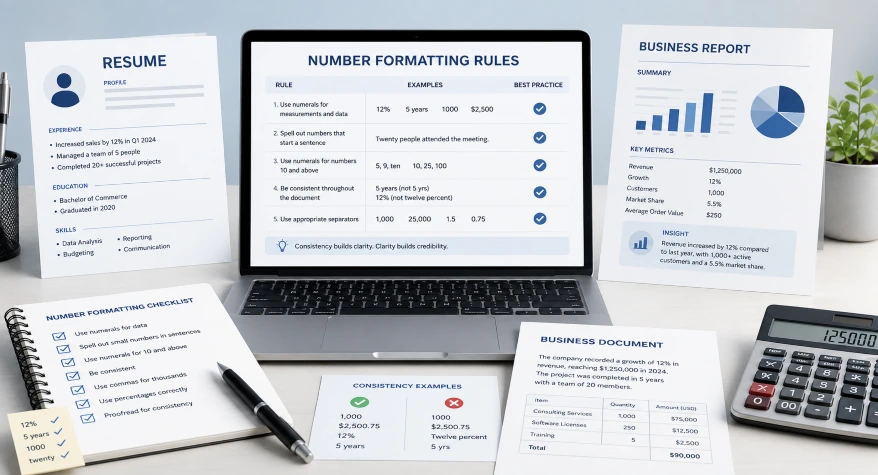
Number formatting matters in resumes, business reports, invoices, proposals, and other professional documents. The goal is not to write every number in words or every number as a digit. The better approach is to choose a format that makes important information easy to read and apply it consistently.
For example, a resume might use 5 years of experience, 18% increase in sales, and $50,000 in annual savings because these figures are easy to scan. A business report may use the same approach for revenue, percentages, dates, measurements, and other data.
This guide explains practical number formatting rules for resumes, reports, and business writing, including when to use words, when to use digits, and how to keep numbers consistent throughout a document.
Number Formatting on Resumes
A resume should make achievements easy to scan, so numerals are often useful for measurable results such as percentages, money, quantities, dates, and years of experience.
For example:
- Increased sales by 22%
- Managed 8 employees
- Reduced annual costs by $45,000
- Completed 12 projects in one year
- Achieved 98% customer satisfaction
The most important rule is consistency. If you use numerals for measurable achievements, use the same approach throughout similar bullet points rather than switching randomly between numerals and spelled-out numbers.
When a number is part of a sentence rather than a measurable achievement, either style may work depending on the writing style of the resume.
If you need to apply consistent separators, decimal places, or other numeric formats to a group of values, you can use our Number Formatter.
When to Use Words and Digits
The choice between words and digits depends on the type of information and the style of the document.
| Situation | Example |
|---|---|
| Percentages | 18% |
| Money | $25,000 |
| Measurements | 15 kg |
| Years | 2026 |
| Large quantities | 1,500 employees |
| Simple numbers in prose | three departments |
| Number at the beginning of a sentence | Twenty employees attended the meeting. |
For data-heavy documents, digits are generally easier to scan and compare. Words can work well in ordinary sentences when they improve readability.
Most importantly, follow the style guide or organizational standard used for the document and apply it consistently.
For a detailed guide to spelling numbers correctly, see our guide on how to write numbers in words correctly.
Number Formatting in Business Documents
Business documents often contain several types of numerical information, including amounts, percentages, dates, quantities, measurements, and performance figures.
A practical approach is to use numerals for information that readers need to compare quickly.
For example:
- Revenue: $1,250,000
- Operating costs: $850,000
- Growth: 12.5%
- Employees: 245
- Reporting period: January 2026
- Delivery time: 5 days
Words may still be appropriate in ordinary sentences or when required by a particular style guide. The important point is to use a clear system rather than switching formats without a reason.
If you need examples of regional formatting conventions for large numbers, see our guide to formatting large numbers.
Common Number Formatting Mistakes
Several number-formatting problems appear frequently in resumes and business documents.
Mixing words and digits without a reason
For example:
Managed 8 projects and twelve client accounts.
A consistent style would be clearer:
Managed 8 projects and 12 client accounts.
Using inconsistent decimal places
Avoid displaying related financial figures as:
Revenue: $25,000
Expenses: $12,500.75
Profit: $12,499
If the report requires two decimal places, apply that format consistently.
Mixing regional formats
Be careful when documents contain international data. For example:
1,250.50
and
1.250,50
can represent the same value under different regional conventions.
Formatting dates inconsistently
Avoid mixing formats such as:
January 5, 2026
05/01/2026
5 January 2026
unless the document clearly requires different formats.
Choose a suitable format and use it consistently.
Resume Number Formatting Examples
Numerals are particularly useful on resumes when they highlight measurable achievements.
| Less Effective | Better |
|---|---|
| Increased sales by twenty-two percent | Increased sales by 22% |
| Managed eight employees | Managed 8 employees |
| Saved fifty thousand dollars | Saved $50,000 |
| Completed twelve projects | Completed 12 projects |
| Reduced processing time by five days | Reduced processing time by 5 days |
The purpose is not to use digits everywhere. Use them where they make achievements easier to identify and compare.
For example:
Increased annual sales by 22%, reduced operating costs by $50,000, and shortened processing time by 5 days.
This format allows the reader to identify the key results quickly.
Business Report Number Formatting Examples
Business reports usually contain more numerical data than resumes, so consistent formatting becomes particularly important.
For example:
| Metric | Q1 | Q2 |
|---|---|---|
| Revenue | $1,250,000 | $1,480,000 |
| Operating expenses | $850,000 | $910,000 |
| Customer growth | 8.5% | 12.2% |
| New customers | 1,250 | 1,480 |
Keep related values in the same format. If a table uses two decimal places, percentages, or currency symbols, apply those conventions consistently.
For large reports, clearly identify whether amounts are shown in full numbers, thousands, or millions. For example:
Amounts in USD millions
| Metric | 2025 | 2026 |
|---|---|---|
| Revenue | 12.5 | 14.8 |
| Expenses | 8.2 | 9.1 |
| Operating profit | 4.3 | 5.7 |
Practical Number Formatting Rules
Use these simple rules when preparing resumes, reports, and business documents:
- Use numerals for measurable results.
Example: Increased sales by 25%. - Use numerals for money and measurements.
Example: $50,000 and 15 kg. - Keep related numbers in the same format.
Do not mix decimal precision or separators within the same table without a reason. - Use a consistent date format.
Choose a format suitable for your audience and document. - Label large-number units clearly.
If a report displays figures in millions, state this in the table heading. - Follow the organization’s style guide when one exists.
A company, publication, or institution may have its own form
Practical Checklist Before You Publish
Before submitting a resume or business document, check:
- Are similar numbers formatted consistently?
- Are percentages displayed consistently?
- Are currency amounts using the same format?
- Are decimal places consistent where comparison is required?
- Are dates using one clear format?
- Are large amounts clearly labeled as thousands or millions when applicable?
- Are numbers easy to scan in tables and bullet points?
- Does the document follow any required organizational or style-guide rules?
A final formatting check can catch small inconsistencies before the document is submitted or shared.
Final Takeaways
Good number formatting makes resumes, reports, and business documents easier to scan and compare.
For resumes, numerals are particularly useful for measurable achievements such as percentages, money, quantities, and years of experience. Business reports often require consistent formatting for currency, percentages, decimals, dates, and large amounts.
There is no single rule that requires every number to be written as a word or every number to be written as a digit. Choose a format that suits the document, follow any applicable style guide, and apply the choice consistently.
Frequently Asked Questions
1. Should numbers be written as words on a resume?
Usually, measurable achievements are easier to scan when written as numerals. For example, 25% increase in sales is easier to identify quickly than spelling out the percentage. Follow any specific resume or organizational style requirements.
2. When should I use digits in business writing?
Digits are useful for percentages, money, measurements, dates, quantities, and data that readers need to compare quickly. For example, 15%, $25,000, and 12 employees.
3. Should financial figures use decimal places?
Use decimal places when they provide useful precision or are required by the reporting format. The important point is to apply the same level of precision to comparable figures.
4. How should large numbers be formatted in business reports?
Large numbers can be displayed in full or in thousands or millions. If a report uses abbreviated units, clearly label them. For example, a table headed Amounts in USD millions may show revenue as 12.5 instead of $12,500,000.
5. Should dates be formatted consistently in a business document?
Yes. Choose a clear date format appropriate for your audience and use it consistently. This is particularly important for international documents where date conventions can differ.
6. What is the most common number-formatting mistake?
One of the most common problems is inconsistent formatting. Examples include mixing decimal places, switching between date formats, using different currency formats, or randomly changing between numerals and spelled-out numbers.