
Number to Words Converter vs. Excel Macros: Which is Better for Bulk Invoicing?
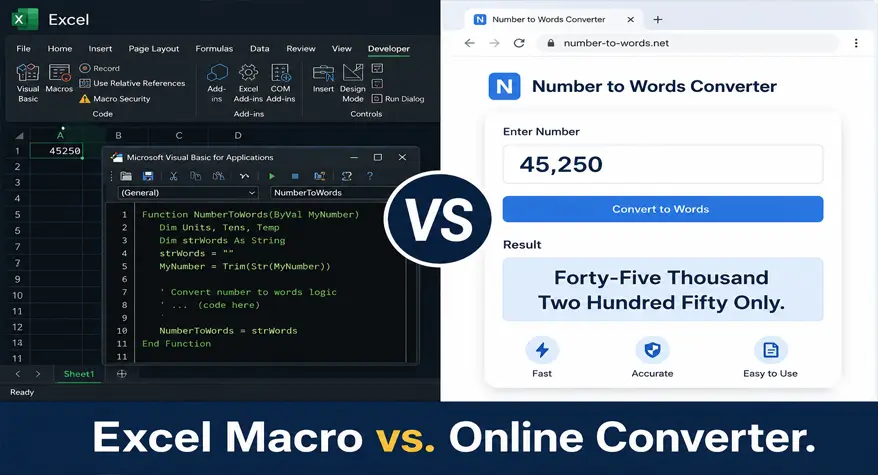
Every invoice has a story, and in accounting, you want to make sure that story is accurate. Probably the most common requirement you’ll come across when dealing with receipts, invoices, and purchase orders is to spell out the cost in words. Whether you’re handling ten invoices or ten thousand, is the approach you adopt fair?
There are only two ways to approach this area: Excel VBA macros and online number to words converters. Both work, but they vary greatly in the amount of time, knowledge, and maintenance they require. Both options are frankly explained in this article, so you can determine which truly matches the way your business operates.
Why Businesses Need Amounts in Words on Invoices
Uses of written-out numbers in a textual context: writing out values in words isn’t a stylistic device; it’s a legal/commercial requirement in most career paths. The banking business, State Contracts, and foreign-trade contracts require, for example, that money values appear both as figures and as keywords to dodge conflicts and forgers.
A cheque printed with “$5,000” and “Five Thousand Dollars Only” makes forgery obvious. This principle is the same for official invoices, particularly if the value is large or the industry is heavily regulated (construction, logistics, health care, etc).
Beyond legality, written amounts reduce misreads. A numeric figure can be misread due to font issues, printing errors, or regional formatting differences. Writing the figure in full eliminates that ambiguity entirely.
For teams handling bulk invoicing — think e-commerce platforms, staffing agencies, or procurement departments — doing this manually for every single record is simply not scalable.
How Excel Macros Convert Numbers to Words
Excel doesn’t have a built-in function that converts numbers to words. There’s no native formula like =NUMBERTOWORDS(A1) waiting in any cell. So users turn to VBA — Visual Basic for Applications — to write custom macros that do this conversion. This is essentially the excel macro for amount in words that many finance professionals rely on when they need a quick in-spreadsheet solution.
A very simple VBA macro function can split a number into its hundreds, tens, units, and decimal parts and then translate them to the corresponding words. It runs in the Excel workbook, and as long as you install it, it will apply to whatever cells you point it at.
This works. It’s been a popular workaround for accountants and finance teams for years. The problem is in the setup — and what happens after.
Pros of Using Excel VBA Macros
Excel macros do offer real advantages, particularly for users who are already deeply embedded in spreadsheet-based workflows.
Works offline: Since the macro lives inside your workbook, there’s no dependency on internet access. This matters in organizations with strict network policies.
Integrates with existing data: If your invoicing data already lives in Excel, a macro can process rows in bulk without requiring you to export or paste data elsewhere.
Customizable: A skilled VBA developer can tailor the macro to handle specific currencies, regional formats (Indian numbering system, for example), or custom phrasing like “Only” at the end.
One-time setup (theoretically): Build it once, and it should work every time — at least until something breaks.
Limitations of Excel Macros for Bulk Invoicing
Here’s where things get complicated. The theoretical simplicity of “build it once” rarely holds up in practice.
Requires coding knowledge: Writing or even copying a VBA macro requires familiarity with the Excel developer environment. For most small business owners, this is a barrier. Errors in the code produce wrong outputs — sometimes without any warning.
Macro security restrictions: Many organizations disable macros by default due to security risks. Getting IT approval to enable macros can take time, and some environments block them entirely.
Version and compatibility issues: A macro built in Excel 2016 might not behave identically in Excel 365. Updates can silently break logic, especially if the file is shared across devices or operating systems.
No support for large-scale batch processing: While macros can loop through rows, they weren’t designed for high-volume automation. Processing thousands of records can slow down your file significantly.
Maintenance burden: If the person who wrote the macro leaves the company, you’re left with code nobody wants to touch. Debugging someone else’s VBA is its own kind of nightmare.
For businesses that need a reliable, scalable solution — especially one that doesn’t depend on a single person’s technical knowledge — this is a real limitation. Many users searching for how to convert numbers to words in excel automatically eventually realize that macros require ongoing attention that simply isn’t sustainable for growing teams.
How Online Number-to-Words Converters Work
Online tools take a completely different approach. You input a number — or a batch of numbers — and the tool returns the written form instantly, no setup required.
Modern platforms like the invoice amount in words generator are built specifically for this use case. They handle currency formatting, decimal handling, and large-number conversion cleanly, without requiring you to understand any code. For anyone wondering about the best number to words converter for invoices, these dedicated online tools consistently outperform generic solutions.
The experience is straightforward: paste your amount, get the result, move on. For teams without technical resources, this is a meaningful difference. Whether you need to convert invoice amount to words online or handle multiple records simultaneously, these platforms deliver results in seconds.
Many tools also support multiple currencies and languages, which matters for businesses dealing with international clients. Writing “Twenty-Five Thousand Euros Only” versus “Vingt-Cinq Mille Euros Seulement” requires handling that goes well beyond what most VBA macros are built for. This is why the number to words converter for accounting has become an essential tool in modern finance departments.
Excel Macros vs. Number-to-Words Converters: Feature Comparison
| Feature | Excel Macro | Number-to-Words Converter |
|---|---|---|
| Setup Time | High | Low |
| Coding Required | Yes | No |
| Bulk Conversion | Moderate | High |
| Accuracy | Depends on Macro | Consistent |
| Maintenance | Required | None |
| Multi-Currency Support | Limited | Often Included |
| Accessibility | Excel Only | Any Device, Any Browser |
| Security Risk | Macro Vulnerabilities | None |
The table makes the tradeoffs clear. Excel macros reward users who invest time upfront and have the technical skills to maintain them. Online converters prioritize immediate usability and consistent output. For those needing an excel VBA amount in words formula, the macro route requires careful coding, whereas online tools offer a plug-and-play alternative.
Which Option Is Best for Accountants and Small Businesses?
The answer depends on your volume, technical capacity, and workflow.
If you’re a developer or a finance team with in-house Excel expertise, a well-built VBA macro can be a powerful embedded tool. It keeps everything in one place and doesn’t require internet access. However, even seasoned professionals often prefer to convert currency amount to words using online tools when dealing with international clients and multiple currencies.
If you’re a small business owner, freelance accountant, or someone generating invoices without dedicated IT support, an online tool wins on every practical dimension. There’s nothing to install, nothing to maintain, and nothing to troubleshoot at 11 PM before a payment deadline.
Bulk invoicing involves handling large numbers quickly and accurately. For teams dealing with hundreds of records at once, manual conversion is not an option — and neither is a slow, error-prone macro. Tools like the number formatter can handle formatting at scale, allowing you to move through large datasets without stopping to debug code. A bulk number to words converter online can process thousands of entries in a fraction of the time it would take a macro to loop through the same data.
For accountants specifically, accuracy isn’t negotiable. A wrong word-form on an invoice — “Fourteen Thousand” instead of “Forty Thousand” — can delay payment, trigger disputes, or create compliance issues. Online converters eliminate this risk by applying consistent logic to every conversion, every time. This is precisely why the number to words converter for invoices has gained such widespread adoption among accounting professionals.
Small businesses benefit most from simplicity. When your energy should be on growth, client relationships, and cash flow, spending hours configuring a macro or chasing down a bug is a poor use of time. Being able to generate invoice amounts in words automatically without any technical overhead frees up valuable resources for core business activities.
Summary: Making the Right Call for Your Invoicing Workflow
Excel macros are useful tools in the right hands, but they come with real costs — setup time, maintenance, and the risk of silent errors. They’re not a practical solution for teams without technical resources or for businesses processing large invoice volumes regularly. If your goal is to convert large numbers to words for invoices consistently and without hassle, the macro approach often falls short.
Online number-to-words converters offer a cleaner path. They’re fast, accessible, and built to handle the specific task of converting amounts into written form for invoices and financial documents. The invoice amount in words generator is a reliable starting point for businesses that want accuracy without complexity. For those who frequently need to write cheque amount in words online, these tools provide instant, error-free results every time.
For most accountants and business owners, the right choice isn’t the most technically impressive one — it’s the one that fits seamlessly into an existing workflow and doesn’t require babysitting. Whether you’re looking to convert invoice amount to words online for a single transaction or process hundreds of records, the online approach delivers consistent value with zero learning curve.
Frequently Asked Questions
1. Can Excel convert numbers to words without VBA?
Unfortunately, there is no such function in Excel yet. There is no built-in formula in Excel that can convert numbers into words. You will require an Excel add-in written in VBA macro, some 3rd party plug-in, or an online number to words converter to display the number as words. For general users who do not have any knowledge of coding, the online number to words converter is quicker and more practical. This is why so many professionals search for how to convert numbers to words in excel automatically only to discover that the most practical solution exists outside of Excel itself.
2. What is the best alternative to Excel macros for converting numbers to words?
Using an online converter is the simplest option. There is no setup required, no coding, and they work on any device. For those needing invoice-specific word expressions, a dedicated invoice amount in words generator takes care of money formatting and of big numbers, all the time, avoiding the security issues of VBA macros and their maintenance. It has become the best number to words converter for invoices for countless accounting teams worldwide.
3. How do accountants generate invoice amounts in words?
Accountants use a mix of methods depending on their workflow. Some use Excel VBA macros embedded in invoice templates. Others rely on accounting software that auto-generates written amounts. Increasingly, many use online bulk number-to-words converters for one-off or batch conversions, especially when working with clients who require specific formatting on invoices or payment receipts. The ability to generate invoice amounts in words automatically has become a standard expectation in professional accounting.
4. Is an online number-to-words converter more accurate than Excel VBA?
If the conversions are run through a macro, then very likely yes. An Excel macro is only accurate if it was written the first time accurately and can deal with edge cases such as decimals, large values, or regional variations and standards. Web converters are designed specifically for it and run through the same logic on every conversion so it is less susceptible to unnoticed errors. For professionals who need a reliable number to words converter for accounting, online tools offer superior consistency.
5. Can I convert thousands of invoice amounts into words automatically?
Yes, but it depends on the way you do things. Sure, a VBA macro can go over lines in Excel, but it can be slow if the size increases. Online solutions built for bulk conversion can handle much higher volumes much faster and remain stable without any intervention. So, if you are dealing with thousands of records every day, then maybe a good solution is to switch from Excel to a dedicated bulk solution. A bulk number to words converter online is specifically engineered for this exact scenario, making it the practical choice for high-volume environments.